


Buy TRON Energy with TronBid: SELL Offers, BUY Orders or Quick Rent
Compare the three purchase flows on TronBid: buying an existing SELL offer, creating a BUY order that waits for a seller, and using the separate Quick Rent service. Check price, term and delegation status before using the Energy.
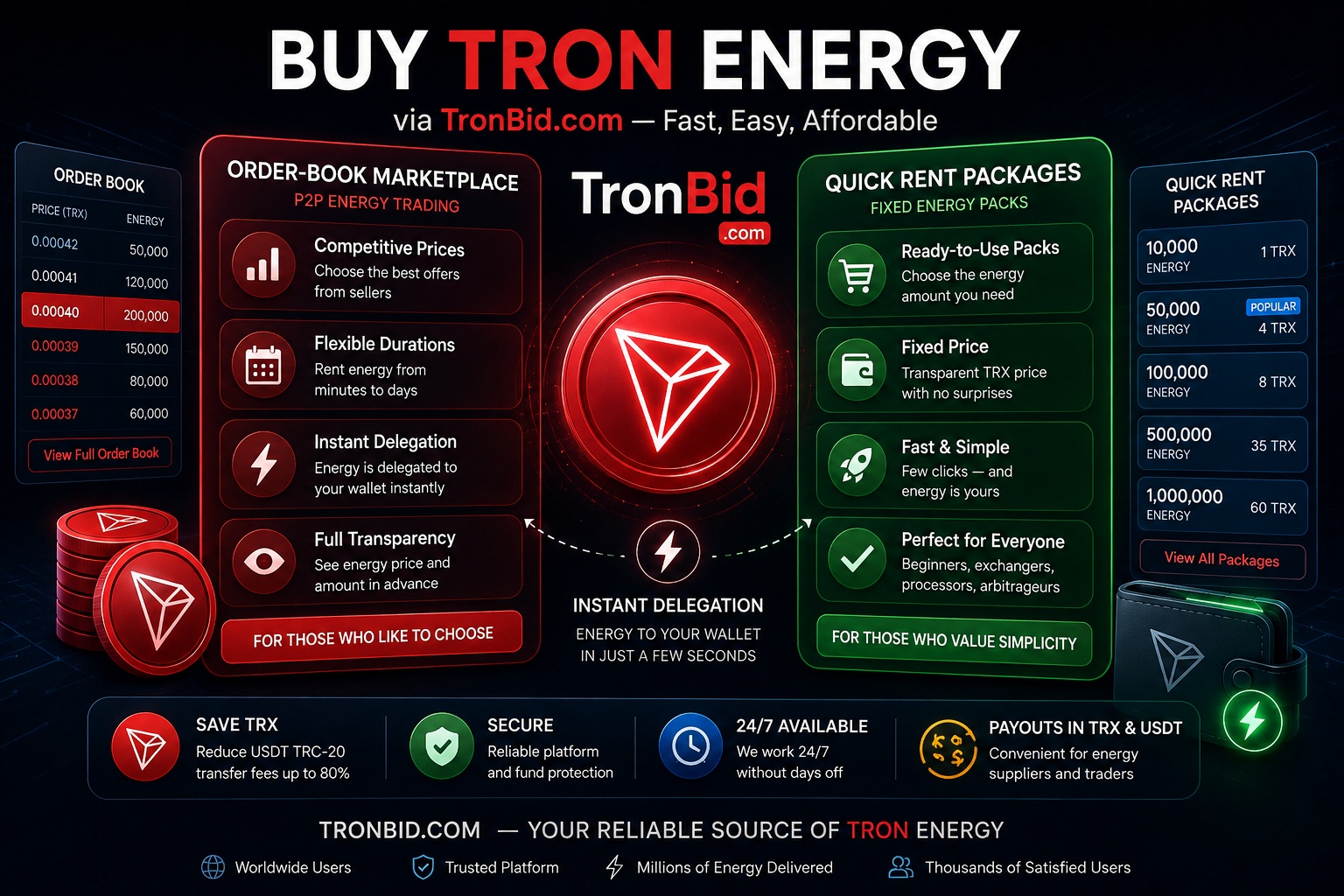
- Buy TRON Energy: TronBid Marketplace and Fixed-Price Quick Rent
- Buy TRON Energy via TronBid: Order-Book Marketplace or Quick Rent
Why Do USDT TRC-20 Fees Sometimes Come as an Unpleasant Surprise?
Have you ever sent USDT TRC-20 and wondered, “Why did the network burn so many TRX again?” Don’t worry—you’re not alone. The TRON ecosystem uses a resource-based system, and smart contracts consume Energy.
If your wallet doesn't have enough Energy, the network automatically charges transaction fees in TRX. As a result, a simple USDT transfer can become much more expensive than expected.
The good news is that you don't need to buy and freeze thousands of TRX. Renting the required amount of Energy through TronBid.com is much easier. And you have two options: the order-book marketplace or Quick Rent with fixed packages.
Just mathematics and common sense.
What Is TRON Energy?
Energy is the resource used for TRON smart-contract execution. Staking can provide resource capacity; delegation can make it available to another account. Recovery replenishes used capacity gradually, but waiting does not create an allocation for an account that has none. Read staking versus rental and how Energy recovery works before choosing a purchase.
For a complete price comparison, include the rental payment, any remaining resource shortfall and Bandwidth. Use the rental-cost checklist rather than comparing unit prices alone.
TronBid.com Marketplace: Buy TRON Energy Through the Order Book
TronBid.com is a P2P marketplace. You can buy an existing SELL offer with its displayed price and term, or create a BUY order at your chosen price and wait for a seller to fulfill it. A newly created BUY order is not a guarantee of immediate matching or delegation.
Benefits of the Marketplace
Competitive Prices
Energy providers compete with one another, allowing users to find attractive rates.
Flexible Rental Duration
You can choose Energy packages for a few hours, one day, or longer periods.
Delegation Depends on the Purchase Flow
Buying an existing SELL offer follows that offer's checkout and delegation process. A BUY order waits for a seller to accept and fulfill it. Always check the order status and confirmed delegation before using the resources.
Transparency
You immediately see the amount of Energy you receive and how much it costs.
Payouts in TRX and USDT
Energy providers can receive payouts in both TRX and USDT, making the platform especially convenient.
If you like controlling prices and selecting offers yourself, the marketplace is a great choice.
Need TRX for the purchase but currently hold USDT? Before reserving an offer, you can buy TRX with USDT TRC-20. Wait for the exchange payout to reach your own wallet, then start the resource purchase and follow its checkout instructions. The exchange deposit address and the resource payment address serve different purposes.
Practical walkthrough: buying an existing SELL offer
For a USDT TRC-20 transfer, first estimate the Energy needed in the calculator. The estimate helps you choose a volume; it does not reserve resources or replace the checkout quote.
- Choose a SELL offer. In the marketplace offers linked below, select Energy and compare the available seller offers. Use the Buy action on the offer you want, not the action for filling someone else's BUY order. If no suitable offer is available, the separate Create a BUY order link lets you set your own terms and wait for a seller; Quick Rent remains a different product.
- Check the purchase before reserving. In Buy resource from seller, check the available volume, rental duration and recipient address, then enter How much to buy and review the TRX amount. The unit price in SUN is not the total payment. A connected-wallet purchase uses the displayed wallet as recipient. Guest checkout asks for one TRON address for both receipt and payment: the resource goes there and payment must come from that same address. If availability, the quote or an active delegation check prevents checkout, do not proceed on the old terms.
- Reserve, then use the current payment instructions. Reserve and continue to payment opens the payment window with the exact TRX amount, payment address and countdown. The offer is reserved for 15 minutes; do not pay after that window expires. Use one available method: the connected-wallet action, a manual TRX transfer to the displayed address, or Pay from balance when enabled and sufficiently funded. Guest checkout does not offer balance payment. USDT seller payouts are not an instruction to send USDT to this checkout address.
- Verify delivery, not just payment. Follow the separate Payment received, Delegating the resource and Resource successfully delivered stages. Before sending USDT, check the recipient's available Energy and confirmed delegation in the wallet or TronScan. A submitted payment or a screenshot of it is not proof that the resource is already available.
- If something goes wrong, keep the purchase details. Record the order number, recipient, payment transaction ID if one exists, and the displayed status or error. If payment was submitted but its outcome or delivery is unclear, do not send it again just to refresh the status. Use the support contact in the site footer or contact TronBid support. Never send a seed phrase or private key. A failed or delayed delivery requires checking the particular purchase; this walkthrough does not promise a refund or a fixed resolution time.
Quick Rent: Fixed Packages Without Complexity
Not everyone enjoys studying order books and comparing offers. Sometimes you just want a "click and done" experience.
That's exactly why Quick Rent exists.
Quick Rent provides ready-made Energy packages with fixed TRX pricing. Everything is simple:
- Choose a package.
- Enter your wallet address.
- Complete the payment.
- Wait for payment confirmation and check the delegation status.
No need to publish a BUY order or wait for a marketplace seller; payment confirmation, network conditions and resource availability still affect processing.
Quick Rent is especially useful for:
- Beginners
- Crypto exchange operators
- Payment processors
- Arbitrage traders
- Users who frequently send USDT TRC-20.
When Can You Use the Delegated Energy?
One of the biggest frustrations with many services is waiting. When you need to send funds immediately, even a few minutes can feel annoying.
Quick Rent processes delegation automatically after payment confirmation. Marketplace BUY orders still require seller fulfillment; buying an existing SELL offer follows its checkout process. Network conditions and resource availability can affect execution time.
Check that delegation is confirmed and enough Energy is available before sending USDT TRC-20. Payment alone does not mean the resources are already available.
Yes, time moves differently in crypto. Especially when the market has changed three times and you're still staring at the word "Pending".
Why Is Fixed Pricing Convenient?
Transparency matters.
With Quick Rent, you know in advance:
- How much Energy you'll receive
- How many TRX you'll pay
- How long the rental period will last.
No hidden fees. No unpleasant surprises.
This approach is particularly appreciated by users who perform dozens of transfers every day and want predictable costs.
Marketplace or Quick Rent: Which One Should You Choose?
- The Marketplace Is Ideal If:
- You want the best available prices
- Flexibility is important to you
- You frequently buy large amounts of Energy.
- Quick Rent Is Perfect If:
- You prefer maximum simplicity
- Fixed pricing matters to you
- You need Energy immediately
- You don't want to deal with order books.
Fortunately, you don't have to choose forever. Today you can use Quick Rent, and tomorrow you can buy Energy through the marketplace.
Conclusion
Buying TRON Energy no longer requires freezing huge amounts of TRX or dealing with complicated settings.
TronBid offers two convenient options:
- An order-book marketplace
Quick Rent with fixed-price packages.
The marketplace lets you choose an existing SELL offer or publish a BUY order that waits for a seller. Quick Rent is a separate rental flow. Compare the displayed price, term and status; neither a new BUY order nor payment alone guarantees immediate delegation.